When the Demo Crashed Silently
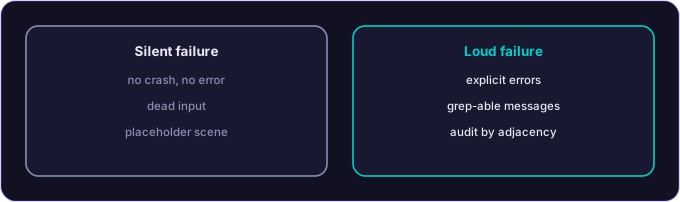
A crash tells you something is wrong. A silent failure ships a polished, empty shell to your users — and your partners. The engine that wins trust is the one that refuses to whisper.
There is a class of bug that is worse than a crash. A crash at least tells you something is wrong. The bug I sat down with this Saturday morning was the other thing. The demo booted. The scene loaded. The UI rendered. The pause menu did not respond. The gameplay was a placeholder. No error. No exception. No log line above INFO. The engine had failed silently and was politely going through the motions of a working game.
This is the post about how to make your engine refuse to do that.
What the demo looked like to a user
Booted clean. Splash screen. Menu screen. Click “Play.” Scene transition. A clean-looking scene. A ship in the middle. A score display in the upper right.
The ship would not move. The input was dead. The pause menu, when summoned, was visually present but unresponsive to clicks. The score said zero and stayed zero. There was no enemy to shoot at. The world was a polite, empty, working-looking shell.
To a developer reading this, the conclusion is obvious within thirty seconds: this is a placeholder. The real gameplay prefabs are missing. The engine fell back to a degraded mode and forgot to tell anyone.
To a user, this is the worst kind of failure. The application does not look broken. It looks finished, and bad.
What was actually wrong
Two distinct problems, each subtle.
The scene loader was silently degrading. The SceneContentLoader is responsible for finding gameplay prefabs and instantiating them into the active scene. When the prefabs are missing (because of a build issue, a missing asset pack, or a configuration mismatch) it falls back to a placeholder configuration. The fallback was supposed to log a clear error. It was logging at INFO. The error message was buried in an unfiltered log stream alongside three hundred other INFO lines. Anyone running the demo and skimming the log saw nothing alarming.
The pause-menu canvas was missing a GraphicRaycaster. This is a Unity-side thing. A canvas that does not have a GraphicRaycaster component cannot receive pointer events. The pause menu was being instantiated correctly, rendering correctly, and being completely deaf to user input. The component’s absence had crept in through a refactor that consolidated several canvas configurations into one. The consolidation dropped the raycaster on one of the canvases.
Both bugs had the same flavor. Something quietly went wrong. The code path continued. The user saw something that looked working but was not.
How I found them
The audit took longer than the fix. The fix took a Saturday afternoon. The audit took the morning. The pattern I want to write down because it will repeat.
The first hint was that the score was stuck at zero. I assumed the bug from last weekend (score double-counting) had been over-corrected. Wrong. Score was zero because there were no enemies. There were no enemies because the gameplay prefabs were not loading. The prefabs were not loading because the scene content loader was falling back to a placeholder and saying so at INFO level instead of ERROR level.
Once I knew that, the second bug became obvious. The pause menu being unresponsive was a separate problem in the same demo, surfaced by the same Saturday session. The audit pattern is “if you found one silent failure, look for adjacent ones.”
What I fixed
A small but precise set of changes.
Promote the placeholder warning to ERROR. When the scene content loader cannot find a real gameplay prefab and falls back to placeholder mode, it now logs at ERROR with the message “PLACEHOLDER MODE: gameplay prefabs missing, demo will not function correctly.” The ERROR severity makes it survive any reasonable log filtering. The exact text “PLACEHOLDER MODE” is unmistakable when you grep the log.
Add an EnsureCrossPlatformInputManager step. Even in placeholder mode, the input system should work. If a developer is testing the demo in placeholder mode (because they are working on the UI without the full asset pack), they need to be able to interact with the menus. The bootstrap now ensures a CrossPlatformInputManager singleton exists in any scene, even placeholder ones.
Add GraphicRaycaster automatically to canvases that need it. The defensive fix is to make the canvas-spawn helper check for the GraphicRaycaster component and add it if missing. This will not paper over future bugs of the same shape, but it removes this specific failure mode from possible.
Verbose boot logging in AutoBootstrap. When the demo boots, the logs now print a short summary of what scene was loaded, what mode it loaded in (real vs placeholder), and what subsystems are present. A developer reading the log can answer the question “did the demo boot in the mode I expected” within ten seconds. Before this morning, the answer required reading three hundred log lines and inferring.
A unit test for the canvas helper. Because the bug was a missing component, the right kind of test is one that asserts the component is present after the helper runs. That test is in the suite now. If anyone refactors the canvas helper in a way that drops the raycaster again, the test will fail loudly.
What this generalizes to
Three patterns to take from this morning.
Silent failure is the worst failure mode. Anywhere your code falls back to a degraded mode, the fallback has to scream. Not at INFO. At ERROR. With a string that grep will find. If the user cannot tell whether the fallback fired, neither can the developer reading the logs three days later.
A missing component in a configuration-driven system needs a test. Unity, Unreal, any engine where a scene is configured out of components: the configuration can drift silently. The defense is a small set of tests that assert “scene of type X has components A, B, C.” Boring tests. Critical tests. Worth writing.
Audit by adjacency. When you find a silent failure, look at every adjacent system. Bugs cluster. The same refactor that dropped the raycaster might have dropped other components on other canvases. The same logging-discipline lapse that buried the placeholder warning might have buried other warnings. Investigate the neighborhood, not just the original sighting.
What partners and builders should take from this
If you are building anything where the engine has multiple degraded modes (asset missing, network out, vendor SDK unavailable), the engine has to tell you which mode it is in, loudly, every time. Quiet degradation is a defect.
If you are evaluating an engine for a partnership, ask the team how they handle silent failures. The right answer is “we surface them at ERROR with grep-able strings and we have audits to find them.” The wrong answer is “we have not seen that problem yet.”
If you are running an agent-driven workflow and your agents are doing refactors, the refactors will occasionally drop components or downgrade log severity by accident. The fix is a small CI gate that verifies critical components are present and critical log messages survive at the right severity. Not glamorous. Effective.
Saturday afternoon. Demo speaks up when something is wrong. Pause menu responds to clicks again. The party with the polite empty demo is over.
Back to building.
An engine that tells you which mode it is in
RakuAI surfaces every degraded mode loudly, at ERROR, with grep-able strings and audits that find the silent failures first. That is the reliability discipline a spatial runtime owes the teams building on it.