Eight Demos, Zero Code: What the SDK Has to Be For
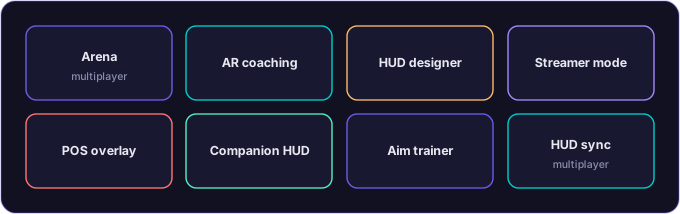
If you cannot describe the demos, you will build the wrong engine. RakuAI's eight canonical demos are the spec - eight ways to prove what your AI does once it can see and act in a real room.
A pattern I have learned the hard way over three previous companies: if you cannot describe the demos before you build the engine, you will build the wrong engine. The demos are the spec. The engine has to deliver each of them. Everything else (architecture, APIs, language bindings, hardware abstractions) is downstream of what the demos need to do.
This Saturday went into specifying the eight demos that will ship with the SDK when the SDK ships. None of them have any code yet. All of them have detailed enough specifications that a competent engineer (or a competent agent) could start building them tomorrow.
Why eight
Three demos would not be enough. Twenty would be too many to do well. Eight is the number where each demo proves a different category of capability and the suite as a whole demonstrates the surface area of what the SDK enables. A studio looking at the eight should be able to find the one that maps to their product and read the source code as a working example. A partner looking at the eight should be able to see the breadth.
The eight categories I am locking in:
1. Solo arena mode
The flagship single-player AR demo. Simulated multiplayer match with score, time, and objectives rendered as HUD overlays. Motion tracking. Gesture triggers. The user is in a real room, moving around, with virtual content reacting to them.
What this proves: the engine can drive a real-time interactive experience with the kind of latency and tracking quality that makes the AR feel grounded rather than slid-on. If this demo plays well, every other demo gets easier. If it does not, nothing else matters.
2. AR coaching and training
A sports-drill simulator. QB throwing motion. Agility drills. Real-time motion feedback overlaid on the user’s actual body movement. Play diagrams visible in space. Coaching audio. Session statistics.
What this proves: the engine can ingest body-pose data and produce useful real-time feedback. The use case is sports, but the underlying capability extends to physical therapy, dance instruction, surgical training, anywhere where an expert needs to coach a learner through a physical task with their hands free.
3. HUD overlay designer
A developer-facing tool. A test scene with configurable HUD widgets. Drag-and-drop placement. Preview the layout in different viewport sizes. Export the configuration to a file that other demos can load.
What this proves: the SDK has a real authoring story for the HUD layer, not just a runtime story. Studios that want to build their own HUD configurations have a working tool to do it with. The export format becomes a contract that the rest of the demos respect.
4. Streamer mode and POV recorder
A demo built for content creators. Live camera overlays. Fan-chat bubbles surfaced as AR content. Gesture-triggered visual effects (a fireball, a celebration emote). Recording overlays for highlight-reel capture. Killcam-style replays.
What this proves: the engine works for live content production, not just gameplay. The same primitives that drive a multiplayer match drive a stream overlay. The streaming use case is also one of the fastest paths to consumer visibility, because streamers are demand-generators.
5. Point-of-service overlay
A commercial-grade demo. Simulated restaurant or retail experience. Gaze and gesture navigation through a menu. Loyalty offers surfaced contextually. Checkout flow. The user is wearing the glasses in a real venue, looking at a real menu, with virtual content augmenting both.
What this proves: the engine works for non-gaming commercial applications. This is where the partnerships pipeline meets the product. Quick-service restaurants, retail chains, hospitality venues. The economics of this category are different from gaming, and the engine has to support them as a first-class use case.
6. AR companion HUD
A second-screen demo. The user is playing a console or PC game on a TV. The glasses display companion information in AR alongside the TV. Minimap. Ammo counter. Friends-online indicators. Connects to the existing game without needing the game’s developer to integrate anything.
What this proves: the engine integrates with existing content rather than requiring it to be ported. This is the most counterintuitive of the eight demos and probably the most important strategically. A user can adopt the glasses without waiting for the games they already play to support them.
7. AR aim trainer
A target gallery. Pop-up targets at varying distances. Scoring overlays. Eye-tracking or gesture for target acquisition. The user practices precision shooting in AR space with feedback.
What this proves: the precision use case. The aim trainer is the demo I expect to be exhibited at events because it is immediately legible to a non-technical audience. It also stresses the tracking-latency budget more than any other demo on the list, which means if it plays well, the engine’s latency story is real.
8. Multiplayer HUD sync
Two or more glasses devices in the same room. Each user has their own HUD, configured to show their own information, but with elements that are shared across the group. Team-color nameplates. Shared objective markers. Group health bars. Sync happens over LAN or Bluetooth. No cloud round-trip.
What this proves: the multi-user case works without a cloud dependency. This is the demo that LAN-party gaming cafes will care about. It is also the demo that proves the engine’s local-multiplayer story before any of the cloud-multiplayer infrastructure has to exist.
What the suite as a whole proves
Each demo above is a single category of capability. The suite together proves something larger.
The engine is general-purpose. Eight demos that share the same SDK and the same runtime, doing eight very different things, demonstrate that the engine is not a single-genre vertical product.
The SDK is real. A studio looking at the source for any of the eight demos can read it and learn the SDK from a working example. That is a much stronger onboarding story than “here are the API docs, good luck.”
The HUD overlay model is the underlying primitive. All eight demos share a HUD-driven interaction model. That tells the engine team what to build first and tells the SDK team what to make easy.
The hardware target is plausible. Eight specific demos that exercise specific hardware capabilities (motion tracking, eye tracking, gesture, audio, video capture, LAN sync) give the hardware partners specific things to optimize for.
What is next
Next Saturday goes into the folder structure for the SDK itself. With the demos locked in, the SDK has to be organized so each demo has its own home, the shared modules are separable, and the docs make all of it findable. The Saturday after that goes into the API surface that all eight demos consume.
The patent estate that anchors this product has been waiting more than a decade for the hardware to catch up. The hardware is catching up. The eight demos above are the bet on what the product is for once the hardware arrives.
The demos are the spec. The engine has to deliver each of them. Tomorrow does not start the code. The Saturday after that does not start the code. The right Saturday for the code to start is the one when the demos are fully specified, the SDK is fully designed, and the agents that will build it are fully assembled.
I am taking the time. The version that ships will be the one that knew what it was for before the first line of it was written.
See what your studio can build on the runtime
Eight demos, eight categories of product - read the working examples and start shipping spatial experiences your AI assistant can drive in the real world.